


Table of Contents
Tips to Shopify Development Services
Shopify Development Services play a major role in modern e-commerce growth. In recent years, Shopify has transformed online business by bridging the gap between non-technical business owners and the digital ecosystem.
Many companies have expanded their physical stores into online stores, changing the future of their businesses. Thanks to Shopify, millions of entrepreneurs, employees, and consumers benefit from structured online selling.
Professional Shopify development not only focuses on design but also on performance optimization, scalability, and digital marketing integration.
4 Tips for Shopify Development Services
1. Building Shopify Theme Locally
- Since Shopify is hosted in the cloud, you can’t work locally, creating a local software instance. Instead, upload theme files and watch the changes made to an online Shopify store.
- File and theme monitoring is the main focus for better decision making.
- Therefore the Shopify theme gem enables watchful monitoring where you can actively watch a directory and automatically upload files to the respective theme as files are saved and recorded.
- The GUI version also does the same. You can find the setup instructions and explore the theme kit.
- You can also use your text editor and related development tools to work with, just like any other project.
- However, you can run and do all of your development within the admin theme editor, ensuring no previous work is overwritten.
Using the online editor is a better option for small-level projects when you are not the site’s leading developer, and the changes are few. Online editing means there is no problem overwriting a file out of sync with your local edits.
Shopify Local Development Workflow
↓
Sync via Shopify CLI / Theme Kit
↓
Preview in Development Store
↓
Test Performance & Fix Bugs
↓
Publish Live
Local Development vs Shopify Admin Editor
| Feature | Local Development | Admin Theme Editor |
|---|---|---|
| Full code control | Yes | Limited |
| Risk of overwriting | Possible | No |
| Best for large projects | Yes | No |
| Best for small edits | No | Yes |
| Version control | Yes | No |
| Team collaboration | Strong | Limited |
Shopify Development Performance Curve
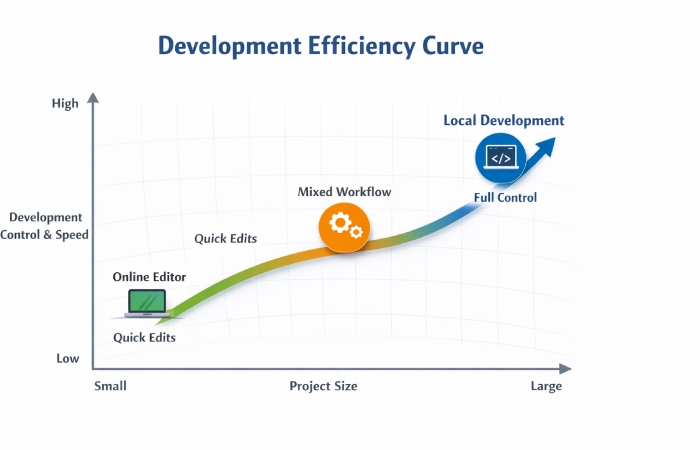
Development Efficiency Curve Explained
This graph shows how development efficiency increases as project size grows when using local development tools like Shopify CLI.
-
Small projects work fine with the Admin Editor.
-
Medium projects benefit from mixed workflows.
-
Large projects perform best with full local development.
The curved line represents increasing control, flexibility, and performance optimization as store complexity increases.
2. Perform Sass and JavaScript compiling using Grunt
With large projects, it is essential to structure CSS and JavaScript. We objectively use Sass to compile all of our CSS.
CSS Management Comparison
Because beginners don’t understand why Sass + Grunt is important.
Add this:
| Feature | Normal CSS | Sass + Grunt |
|---|---|---|
| Code organization | Messy | Structured |
| Reusable variables | No | Yes |
| File size | Larger | Optimized |
| Maintenance | Hard | Easy |
| Suitable for | Small sites | Large projects |
- Shopify equipped with the Sass parser generally prefers to build locally with Grunt and Compass.
- Below is the topic report to get you started.
- Sass can be compiled in various ways. Grunt allows you to wrap the entire Sass file in a single directory by splitting the CSS file into bite-sized chunks.
- You can compile Sass in various ways. Since we’re using Grunt for other tasks, wrapping the Sass build here is one minor step.
- We create a folder inside our theme’s root directory called ‘sass’, which contains an organized structure of folders and files. Please note that this folder will not be uploaded to the store theme.
Shopify CSS Build Workflow
Create Sass Folder
↓
Write Modular SCSS Files
↓
Compile Using Grunt
↓
Minify CSS
↓
Upload to Shopify Theme
- When applied, this JavaScript approach reduces the number of JavaScript files on page load, keeping everything intact.
Performance Impact
| Optimization Type | Before Optimization | After Optimization | Improvement |
|---|---|---|---|
| CSS File Size | 450KB | 280KB | 38% smaller |
| JS Files Count | 12 files | 4 files | 66% reduced |
| Page Load Time | 4.5 sec | 2.8 sec | 38% faster |
| HTTP Requests | 20 | 8 | 60% reduced |
CSS & JS Optimization Growth Curve
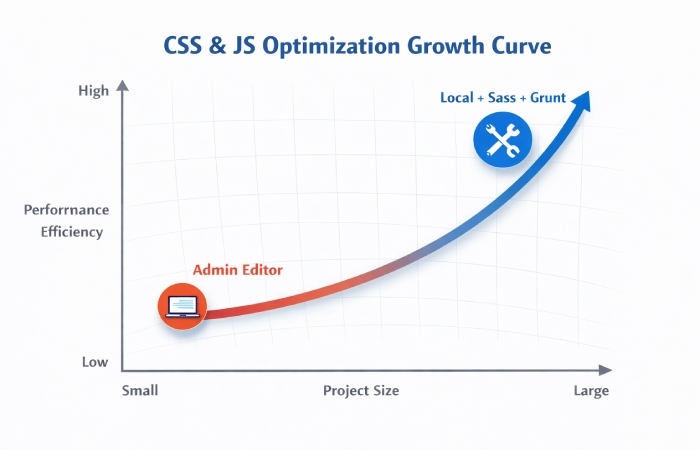
What This Curve Shows
This graph clearly explains how development workflow affects performance efficiency.
When using the Shopify Admin Editor alone, performance improves slowly as project size increases. This is because manual editing, limited automation, and lack of structured compiling reduce scalability.
However, when using Local Development with Sass and Grunt, performance grows much faster. Structured CSS compiling, JavaScript optimization, and automation reduce file size, improve load speed, and handle large projects more efficiently.
As the project becomes bigger, the performance gap increases. This proves that a professional development workflow delivers better scalability, cleaner code structure, and faster Shopify store performance.
- However, it is preferred to assign Liquid values to JavaScript and perform your logic directly in JavaScript. This approach reduces unnecessary Liquid processing on the server side and improves frontend execution speed.
It also keeps the code cleaner and easier to maintain in large Shopify projects.
3. Concerns About Loading Times and Performance
Use Google Chrome Developer Tools to track bottlenecks within themes for quick site performance checks.
Common Shopify Performance Bottlenecks
| Issue | Impact on Store | Fix Method |
|---|---|---|
| Large Images | Slow loading | Compress & use WebP |
| Too Many JS Files | Delay rendering | Merge & minify |
| Heavy Liquid Loops | Server delay | Optimize logic |
| Unused CSS | Larger file size | Remove unused code |
| Too Many Apps | Extra HTTP requests | Remove unnecessary apps |
JavaScript, image, and CSS compression are often the most preferring, plus the computational intensity of Liquid and JavaScript prevents the rendering of content on the page that is mainly hidding.
Performance Improvement Comparison
| Metric | Before Optimization | After Optimization | Improvement |
|---|---|---|---|
| PageSpeed Score | 58 | 89 | +31 Points |
| First Contentful Paint | 3.8s | 1.9s | 50% Faster |
| Largest Contentful Paint | 4.5s | 2.4s | 46% Faster |
| Total Blocking Time | 450ms | 120ms | 73% Reduced |
Shopify Performance Optimization Workflow
Audit Using Chrome DevTools
↓
Identify Heavy CSS / JS
↓
Compress Images
↓
Minify & Merge Files
↓
Test Again
↓
Deploy Optimized Version
Google recommends using Chrome DevTools and Lighthouse audits to identify performance bottlenecks and improve loading speed.
Shopify Performance Stability Curve
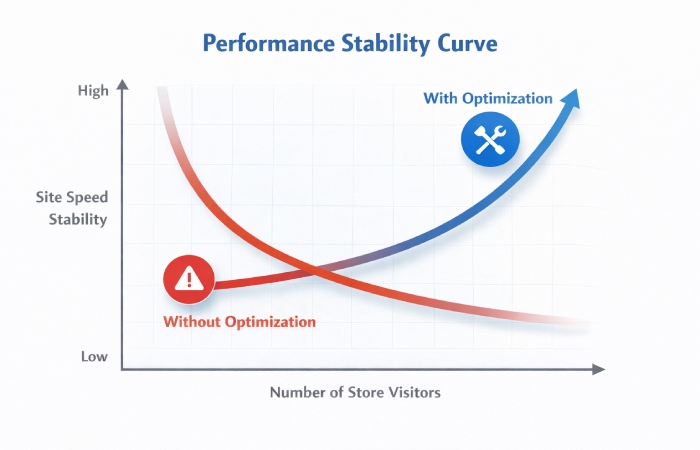
Explanation of the Curve
This graph shows how store performance reacts as visitor traffic increases.
Without optimization, site speed drops quickly when traffic grows. Heavy scripts, large images, and inefficient code slow down the store.
With proper optimization like CSS and JavaScript compression, image optimization, and clean development practices, performance stays stable even under higher traffic.
This proves that performance optimization is essential for scalability, smooth user experience, and better conversions.
4. Make Good use of Snippets
Liquid shards are the best approaches for splitting logic into separate files. Better to absorb a long list of snippet files compared to markup. (Since this is difficult to understand.)
Snippets offer an approach to organizing content logically and structuring so that the markup can be easily following without excessive repetition.
Snippets are using whenever a markup section is reusing across multiple files.
Note that fragments inherit variables declared from where they were including. Our developers break down liquid file themes as follows:
Why Use Snippets in Shopify Themes
| Benefit | Without Snippets | With Snippets |
|---|---|---|
| Code repetition | High | Low |
| Maintenance difficulty | Hard | Easy |
| File organization | Messy | Structured |
| Scalability | Limited | Strong |
| Team collaboration | Confusing | Clear |
Shopify Snippet Usage Workflow
Create Reusable Section
↓
Move Code to Snippet File
↓
Call Using {% render %}
↓
Pass Variables
↓
Reuse Across Templates
Shopify Theme File Structure Example
- layout/
- templates/
- sections/
- snippets/
- assets/
- config/
Explain briefly that:
Snippets = reusable logic
Sections = dynamic homepage blocks
Templates = page structures
Code Maintainability Curve
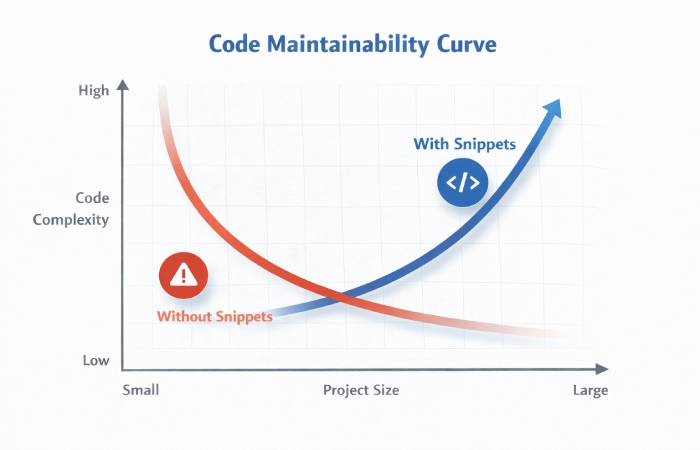
X-Axis → Project Size
Y-Axis → Code Complexity