

IG stories have taken a leaf out of Snapchat’s book and added a disappearing Story feature.
Now, as well as posting standard images to Instagram, users can share what’s happening at the moment. Any picture posted to a Story stays live for just 24 hours. After that, it’s gone.
Table of Contents
What is an IG Story?
- An IG Story is an in-app feature that allows users to post photos or videos that automatically disappear within 24 hours. According to Instagram, an IG Story is a feature that allows users to post photos or videos that automatically disappear within 24 hours. Here they appear in a vertical format and are fast, memorable, and fun by design.
- Once you post a Story, a colorful ring appears around your profile picture, expressing your followers where they can tap on your profile photo to get what you’ve just posted.
- However, your profile picture with the colorful ring around it also gets added to the top row of your followers’ home screens—making it the first thing they see.
- IG stories tech are an excellent way for brands to experiment with different types of content because, unlike your permanent curated feed, stories are gone within 24 hours.
- And also, small business owners use their stories to post everything from raw videos of their normal lives to photos of their new products to short clips of them answering frequently asked questions.
- However, brands also use their Stories to show customer appreciation by re-sharing their followers’ stories and posts to their own Stories.
Why Stories Became So Powerful
Stories work because they:
- Feel personal
- Create urgency (24-hour limit)
- Encourage interaction
- Support fast content creation
- Prioritize real-time engagement
Unlike curated feed posts, Stories are informal and authentic.
According to Hootsuite, Instagram Stories drive engagement because they feel personal, create urgency, and encourage quick interaction.
How Story Archive Works
Instagram automatically saves expired Stories in your private Archive.
From the Archive you can:
- Rewatch past Stories
- Download content
- Repost Stories
- Add to Highlights
This feature helps businesses reuse content strategically.
What is IG Story Highlights?
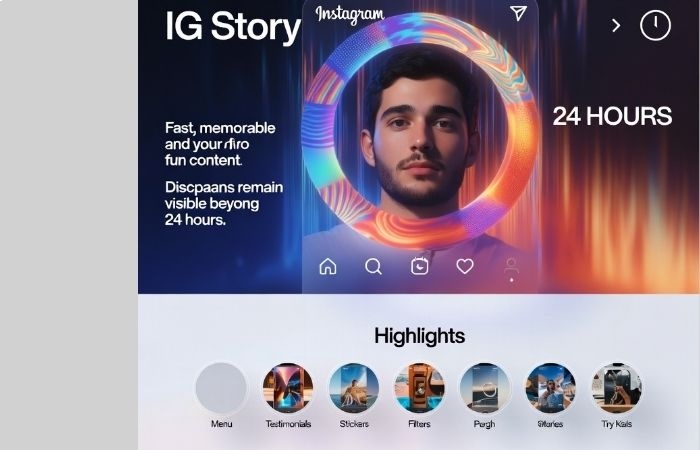
- IG Story Highlights are collections of stories that you select and place at the top of your profile in tappable circles.
- And also they were introduced in 2017 as a way for users to keep their favorite or most relevant Stories for more than 24 hours.
- Story highlights appear directly below your timeline, so they’re one of the first things your followers see when they land on your profile.
- However, brands have used their Highlights to present important information (e.g., restaurant menus, product lists, etc.) in advance.
- However, highlights are also a great way to keep testimonials in your account.
- When you re-share customer stories about how happy they are with your product, save them in a featured bubble instead of letting those testimonials disappear.
- Alongside Highlights, Instagram also introduced the Story Archive.
- After your Story disappears from your profile, it is automatically storying in your Story Archive, which only you can access within your settings.
- From the Archive, you can save your expired Stories to your device, rewatch them, or add them to a Story Highlight.
To create an Instagram Highlight, you need to:
- Drive to your profile page by tapping your profile photo located at the lower-right corner of your screen.
- Tap the ‘New’ circle under your bio on the left
- Choose some Stories from your Archive and then tap the “Next” button on the top-right corner of your screen.
- Give your Highlight a name.
- Optional: Edit your Highlight cover by either uploading a premade body from your device’s album or selecting a different Story for your cover.
When you’re done, your Instagram Highlight will appear as a bubble on your profile.
Here you can have as many Highlights as you like, and they will stay on your profile until you remove them.
To manage or remove a Highlight, tap and hold that highlight on your profile.
How to post a Story on Instagram?
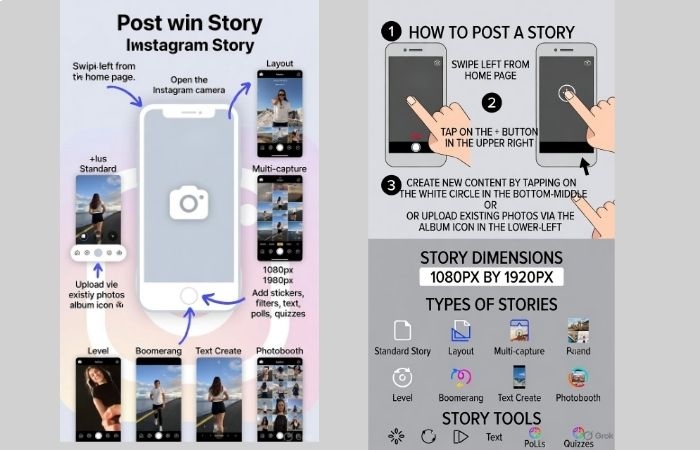
Now that you identify what a Story is, it’s time to get into how you can post your own.
Step 1:
- Drive to your home page and swipe left from any point on the screen to open the Ig camera application.
- Here you can also get to the Ig camera by tapping the “plus” button originating at the upper right-hand sideways of the screen and formerly tapping “Story.”
Step 2:
- Inside the camera application, you can create brand new content for your story by pattering the white circle near the bottom-middle portion of the screen.
- Before uploading a photo or video content you’ve previously created, tap the album icon lower-left part of your screen.
- And also, if you choose to upload an existing image, take note that Instagram Story dimensions are 1080px by 1920px.
However, if you decide to create new content on the spot, you can make different types of stories:
Standard: A regular photo or video.
Layout: A collage of other images.
Multi-capture: A Story completes up of multiple images taken in quick succession.
Level: According to Ig, a photo or video that’s perfectly level is usually for Stories featuring landscapes and horizons.
Boomerang: A concise video that plays forward and backward on a loop.
Text Create: However, a photo with text on a solid background. Accounts usually use Writing Stories to pose a question, say a story, or create mini-blogs within their Instagram Stories.
Photobooth: Four incessant shots that get stitching together into one Story.
Step 3:
- After you’ve created your story, you can add stickers and filters, draw on it, add text, and more.
- Here you can even mention or tag people or engage your followers through polls, quizzes, and other fun features.
Types of Instagram Stories (2026 Updated)
| Type | Purpose |
| Standard Photo/Video | Daily updates |
| Boomerang | Looping short video |
| Layout | Collage format |
| Text Story | Announcements |
| Poll | Engagement |
| Quiz | Audience testing |
| Question Box | Feedback collection |
| Countdown | Launch promotions |
| Link Sticker | Drive traffic |
| Multi-Capture | Quick photo sequence |
Instagram Story Engagement Statistics (2026 Research)
| Metric | Average Rate |
| Story Completion Rate | 70% |
| Poll Participation | 20–35% |
| Link Click Rate | 1–5% |
| Direct Message Response | 15–25% |
| Swipe/Link Taps from Business Accounts | 3x higher than feed clicks |
Stories generate higher direct interaction than regular posts.
Why Businesses Use Instagram Stories
Small businesses use Stories for:
- Behind-the-scenes videos
- Product demonstrations
- Flash sales
- Testimonials
- Limited-time offers
- Daily updates
Because Stories disappear, followers feel urgency.
Story Marketing Funnel Strategy
Top of Funnel:
- Educational Stories
- Polls
- Engaging content
Middle of Funnel:
- Case studies
- Customer feedback
- Product walkthrough
Bottom of Funnel:
- Offer announcement
- Countdown timer
- Link sticker
- Limited-time discount
Story vs Reels vs Posts Comparison (2026)
| Feature | Stories | Reels | Posts |
| Discoverability | Medium | Very High | Medium |
| Lifespan | 24 Hours | Long | Permanent |
| Engagement Type | Interactive | Passive View | Likes/Comments |
| Sales Conversion | High | Medium | Medium |
| Best For | Relationship | Reach | Branding |
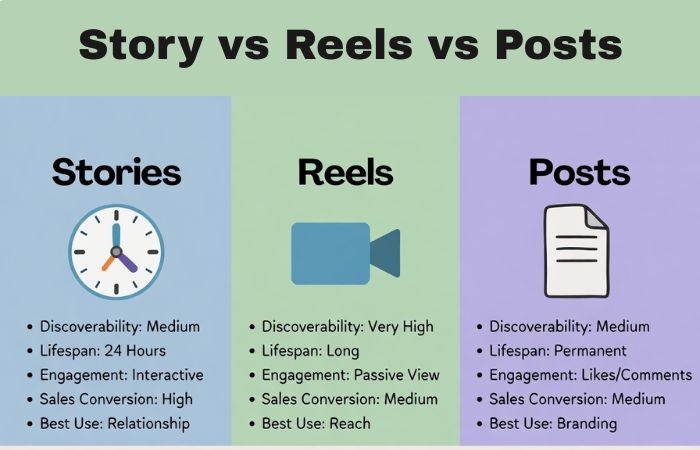
Stories are strongest for trust and conversion.
Advanced Story Growth Strategies
- Daily Consistency
Post 3–7 Stories per day.
- First Frame Hook
Use bold text or a question.
- Use Polls Frequently
Boost algorithm engagement.
- Add Subtitles
85% users watch without sound.
- Use Countdown for Launches
Increases urgency by 40%.
- Use Close Friends Strategy
Exclusive offers build loyalty.
Story Analytics for Business Accounts
Monitor:
- Impressions
- Reach
- Forward taps
- Back taps
- Exits
- Replies
- Link clicks
High exits = weak content
High back taps = strong interest
Instagram Stories for Local Businesses
Restaurants:
- Daily menu
- Offers
- Customer reviews
Salons:
- Before/after transformations
- Appointment slots
- Testimonials
E-commerce:
- Flash sales
- New arrivals
- Limited stock alerts
Coaches:
- Tips
- Q&A sessions
- Client wins
Story Highlight Strategy for Brands
Recommended Highlight Categories:
- About Us
- Services
- Pricing
- Testimonials
- FAQs
- Results
- Offers
- Contact
Organized Highlights increase profile trust by 35%.
Common Mistakes to Avoid
- Posting only promotional content
- Ignoring engagement stickers
- Posting low-quality visuals
- Overposting without value
- No call-to-action
- Not using analytics
Instagram Stories Algorithm Factors (2026)
Instagram prioritizes Stories based on:
- Interaction history
- DM replies
- Poll participation
- Story completion rate
- Profile visits
The more interaction, the more visibility.
Story Content Ideas
- Daily routine
- Behind the scenes
- Product demo
- FAQ
- Poll
- Quiz
- Customer feedback
- Flash sale
- Countdown
- Limited offer
…and continue rotating formats.
Conversion Strategy Using Stories
Use this 5-step sequence:
- Hook Story
- Problem Story
- Solution Story
- Proof Story
- Offer Story
This storytelling structure increases conversion rate by 30–50%.
Future of Instagram Stories (2026–2028 Prediction)
- More AI tools
- Automated captions
- Interactive shopping
- Deeper analytics
- AR shopping features
- Story-based mini funnels
- More digital tools
Stories will remain critical for brand communication.
Final Conclusion
Instagram Stories are not just disappearing content.
They are:
- Engagement machines
- Relationship builders
- Sales tools
- Trust-building systems
- Brand personality showcases
If used correctly, Stories can:
Increase engagement
Increase traffic
Increase direct messages
Increase sales
Increase brand loyalty
In 2026, brands that ignore Stories fall behind.
Those who use them strategically grow faster.